How I learned the OpenAI Agents SDK by breaking down a Stripe workflow from the OpenAI cookbook (part 2)
tldr: I explored the OpenAI Agents SDK with different triage agent setups. With extra tools and handoffs, the workflow finally closed disputes itself. Figuring out the handoff naming in the SDK source code was fun.
Once I was clear on how to call the Stripe API, I kept diging into Dan Bell's post.
Next step: get to know the OpenAI Agents SDK.
By default, OpenAI Agents SDK uses the OpenAI Responses API and enable tracing which relies on the Traces API. This setup is convenient since we can monitor our agents straight from the Traces dashboard.
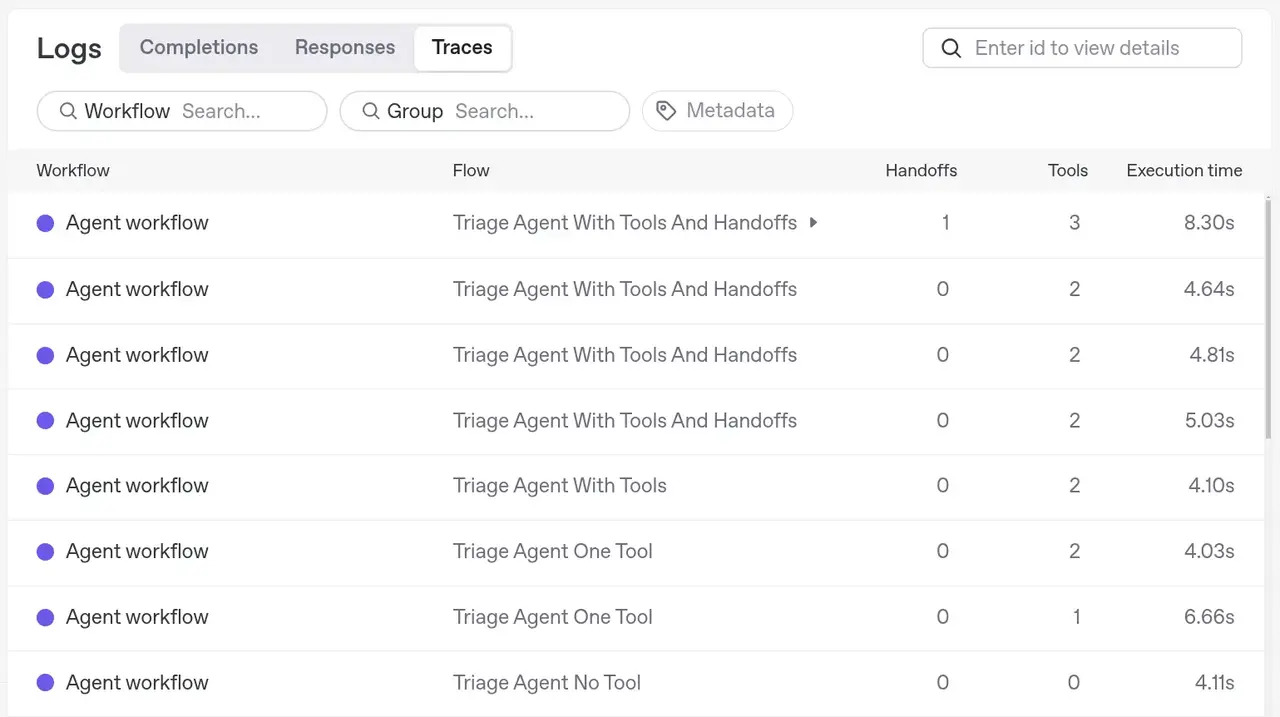
Testing with different Triage agents
To observe behavior when running the agent workflow with
I ran the workflow four times, each with a different triage_agent configuration:
-
No tools, no handoffs:
triage_agent = Agent( name="Triage Agent No Tools", instructions=( "Please do the following:\n" "1. Find the order ID from the payment intent's metadata.\n" "2. Retrieve detailed information about the order (e.g., shipping status).\n" "3. If the order has shipped, escalate this dispute to the investigator agent.\n" "4. If the order has not shipped, accept the dispute.\n" ), model="gpt-4o" ) -
One tool, no handoffs:
-
Two tools, no handoffs:
-
Two tools, two handoffs (as in the article):
I used the same PaymentIntent each time, created like this:
payment = stripe.PaymentIntent.create(
  amount=2000,
  currency="usd",
  payment_method = "pm_card_createDisputeProductNotReceived",
  confirm=True,
  metadata={"order_id": "1234"},
  off_session=True,
  automatic_payment_methods={"enabled": True},
)
And ran the workflow:
Let's break down what happened:
With no tool, the workflow stopped with a text output only. No tool calls were made, and no action was taken on the dispute:
To address the dispute, we need to follow these steps:

1. **Find the Order ID from the Payment Intent's Metadata:**
   - Access the payment intent with ID `pi_3RnJp1QuMzbiv2kf14SQqrm8`.
   - Extract the metadata to locate the associated order ID.

2. **Retrieve Detailed Information About the Order:**
   - Use the order ID to fetch order details such as shipping status.

3. **Check the Order's Shipping Status:**
   - If the order has shipped:
     - Escalate the dispute to the investigator agent.
   - If the order has not shipped:
     - Accept the dispute.

Proceed with the above steps to determine the next course of action.

With one tool, after the first call to GPT-4o, the agent invoked retrieve_payment_intent. But since no tool for order info was available, the agent stopped, asking what method to use next:
The order ID from the payment intent's metadata is "1234".

Next, I'll retrieve detailed information about the order, such as its
shipping status. Could you please provide the service or method you'd
like me to use to obtain the order details?
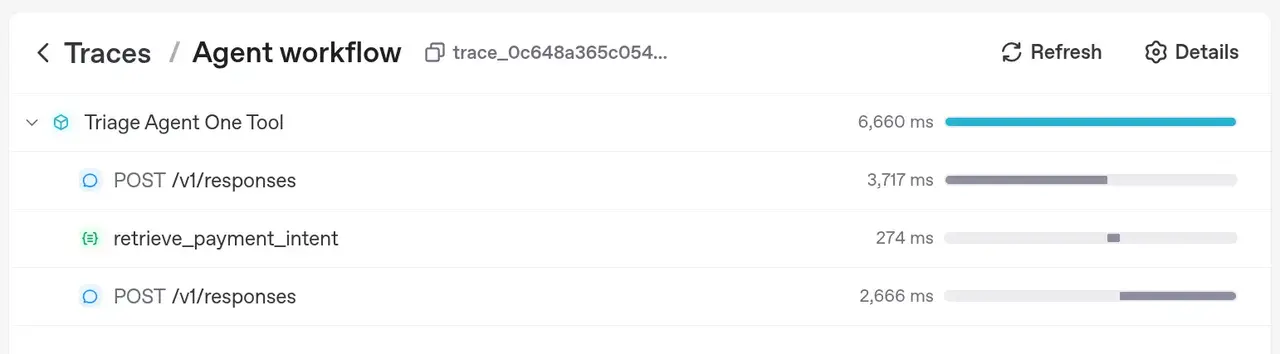
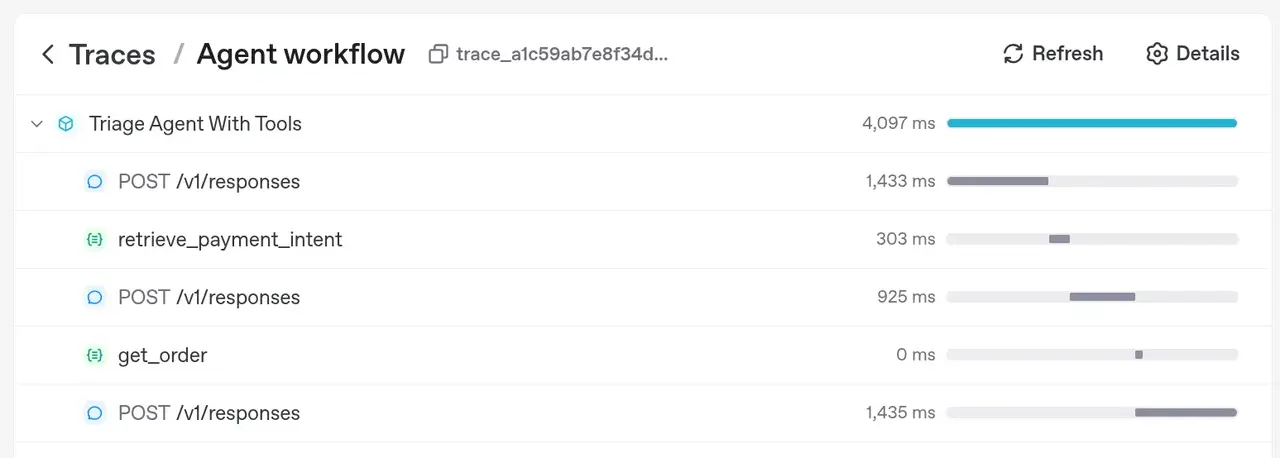
With both tools, the agent first called retrieve_payment_intent to get the order ID, then called get_order for fulfillment details. It then suggested accepting the dispute. The workflow didn't actually close the dispute, as no handoff was defined. Here's the final output:
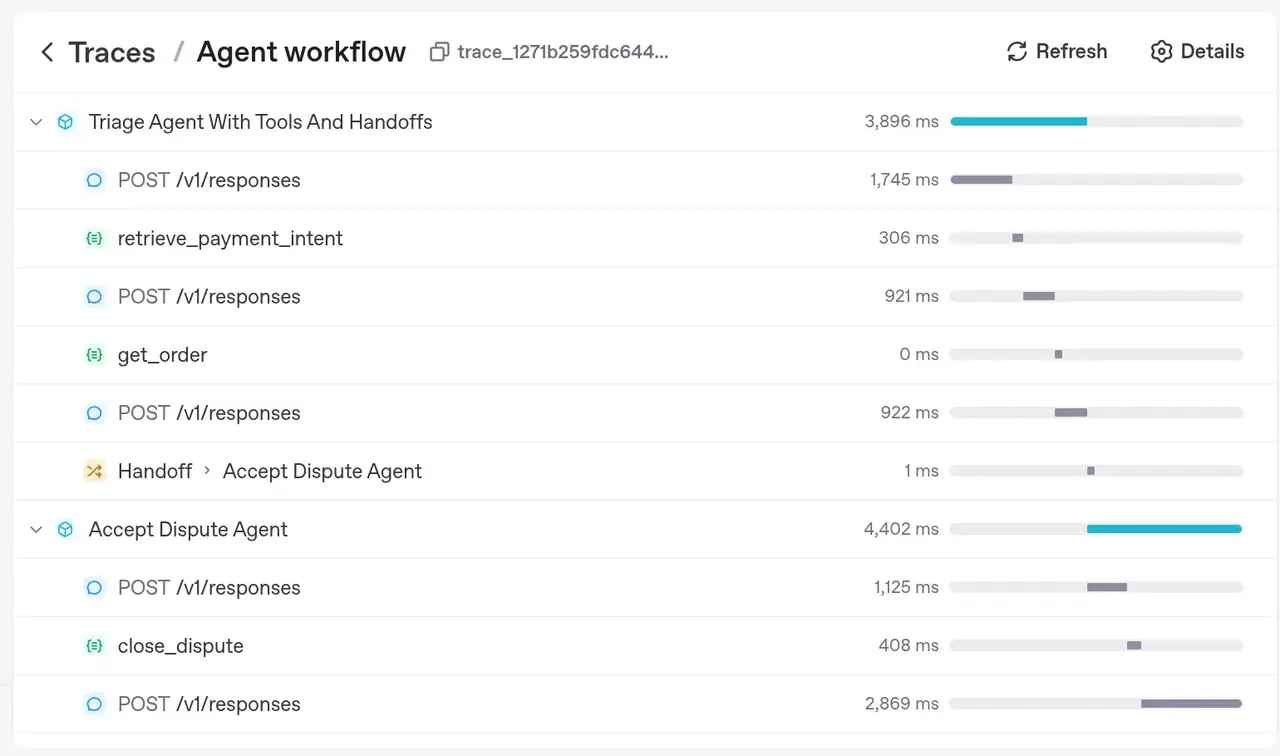
Things got interesting when I added both tools and handoffs to the triage agent (as in the article). This time, the agent called both tools, then the LLM decided to accept the dispute, and invoked a function call to transfer_to_accept_dispute_agent tool. The OpenAI Agents SDK treated this as a handoff. The new agent, accept_dispute_agent, took over, with access to the full conversation history (by default). It then called the close_dispute tool, closing the dispute in Stripe using stripe.Dispute.close(...). Here's the final output:
Dispute Details:
- Dispute ID: dp_1RnJp2QuMzbiv2kfeTMYrELd
- Amount: $20.00
- Reason for Dispute: Product not received

Order Details:
- Fulfillment status of the order: Not shipped

Reasoning for closing the dispute:
The dispute was accepted and closed because the order associated with
the payment was not shipped. The customer was charged for a product
that they did not receive, justifying the acceptance of the dispute.
Who adds the transfer_to_ prefix to handoffs, Responses API or OpenAI Agents SDK?
Sometimes, you know, sometimes you don't! I didn't and it was not clear to me.
tl;dr: The OpenAI Agents SDK is responsible for adding this prefix.
In the Traces dashboard, I noticed that the LLM could use four functions: retrieve_payment_intent, get_order, transfer_to_accept_dispute_agent and transfer_to_dispute_intake_agent.
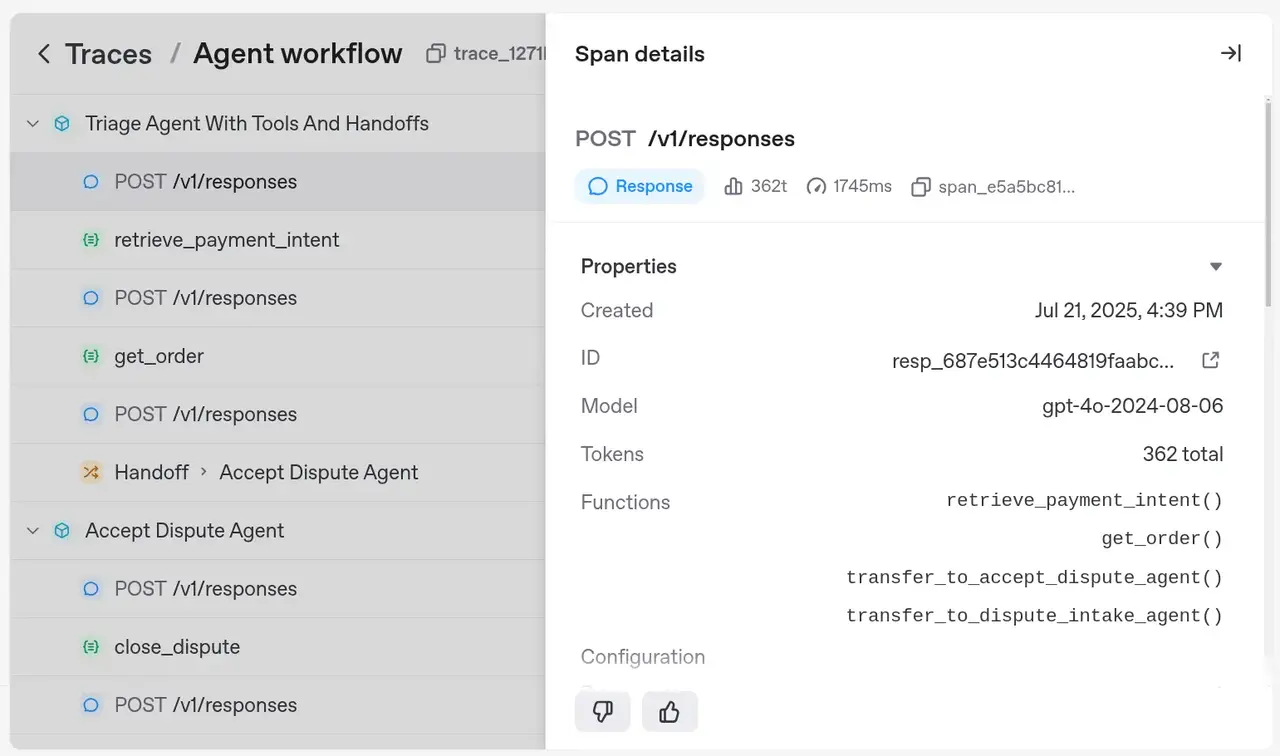
Here's what I wondered: when we define triage_agent like this
triage_agent = Agent(
    name="...",
    instructions="...",
    model="gpt-4o",
    tools=[retrieve_payment_intent, get_order],
    handoffs=[accept_dispute_agent, investigator_agent]
)
why does the Responses API offer tool names like get_order, but for handoffs, they become transfer_to_dispute_agent and transfer_to_dispute_intake_agent (instead of, say, accept_dispute_agent or investigator_agent)?
Is the Responses API changing the tool name, or is it coming from the request payload?
Nothing in the Response API reference! So this must be the SDK's responsibility.
The Handoffs documentation quickly clears this up:
Handoffs are represented as tools to the LLM. So if there's a handoff to an agent named "Refund Agent", the tool would be called
transfer_to_refund_agent.
And the reason for investigator_agent showing as transfer_to_dispute_intake_agent is that its name is "Dispute Intake Agent".
As I never trust the docs blindly, I checked the OpenAI Agents SDK source. Searching for transfer_to, default_tool_name, and handoff\(, I confirmed that when the workflow runs, it does exactly what the docs say:
# src/agents/handoffs.py
@dataclass
class Handoff(Generic[TContext, TAgent]):
    # ...
    @classmethod
    def default_tool_name(cls, agent: AgentBase[Any]) -> str:
        return _transforms.transform_string_function_style(f"transfer_to_{agent.name}")
    # ...

# ...

def handoff(agent: Agent[TContext], ...) -> Handoff[TContext, Agent[TContext]]:
    # ...
    tool_name = tool_name_override or Handoff.default_tool_name(agent)
    # ...
# src/agents/util/_transforms.py
def transform_string_function_style(name: str) -> str:
    # Replace spaces with underscores
    name = name.replace(" ", "_")

    # Replace non-alphanumeric characters with underscores
    name = re.sub(r"[^a-zA-Z0-9]", "_", name)

    return name.lower()
That's all I have for today! Talk soon 👋